Code reviews are essential for maintaining code quality, but they can be time-consuming and often repetitive. Developers find themselves commenting on the same issues across multiple pull requests: missing tests, inconsistent naming, inadequate error handling, and numerous other routine concerns. This creates a bottleneck in the development process, as team members wait for their code to be reviewed while reviewers struggle to balance thorough reviews with their own development work.
An AI assistant can address this challenge by analyzing pull requests before human reviewers, catching common issues and allowing the team to focus on more complex aspects of the code review. This approach doesn’t replace human judgment but enhances it, ensuring that routine issues are caught consistently while freeing up developer time for deeper analysis.
This post demonstrates how to build an automated PR reviewer using AWS Bedrock Agents that analyzes code changes and provides feedback directly in GitHub.
What we’re building
A PR review agent that:
- Gets triggered automatically when a new PR is opened or updated
- Fetches the PR diff from GitHub
- Analyzes the changes using AWS Bedrock
- Posts a detailed review comment with suggestions
- Tracks review history in DynamoDB
The goal isn’t to replace human reviewers, but to complement them by identifying common issues, style violations, and potential bugs before human review begins.
Real-World Applications
This solution addresses common development challenges across different contexts:
Enterprise Development Teams: In large organizations with strict coding standards, the agent ensures consistency across hundreds of developers, reducing the burden on senior engineers who often shoulder the bulk of review responsibilities.
Open Source Projects: Maintainers can use the PR reviewer to handle the initial assessment of community contributions, ensuring they meet project guidelines before dedicating their limited time to review.
Educational Settings: Computer science programs can deploy the agent to provide students with immediate feedback on their code submissions, helping them learn best practices without requiring instructor intervention for every issue.
Continuous Integration Pipelines: The PR reviewer can become part of a broader CI/CD strategy, providing code quality assessments alongside traditional test runs and builds.
Onboarding New Team Members: New developers on a project receive immediate feedback on their work that helps them understand team coding standards more quickly, accelerating their integration into the team.
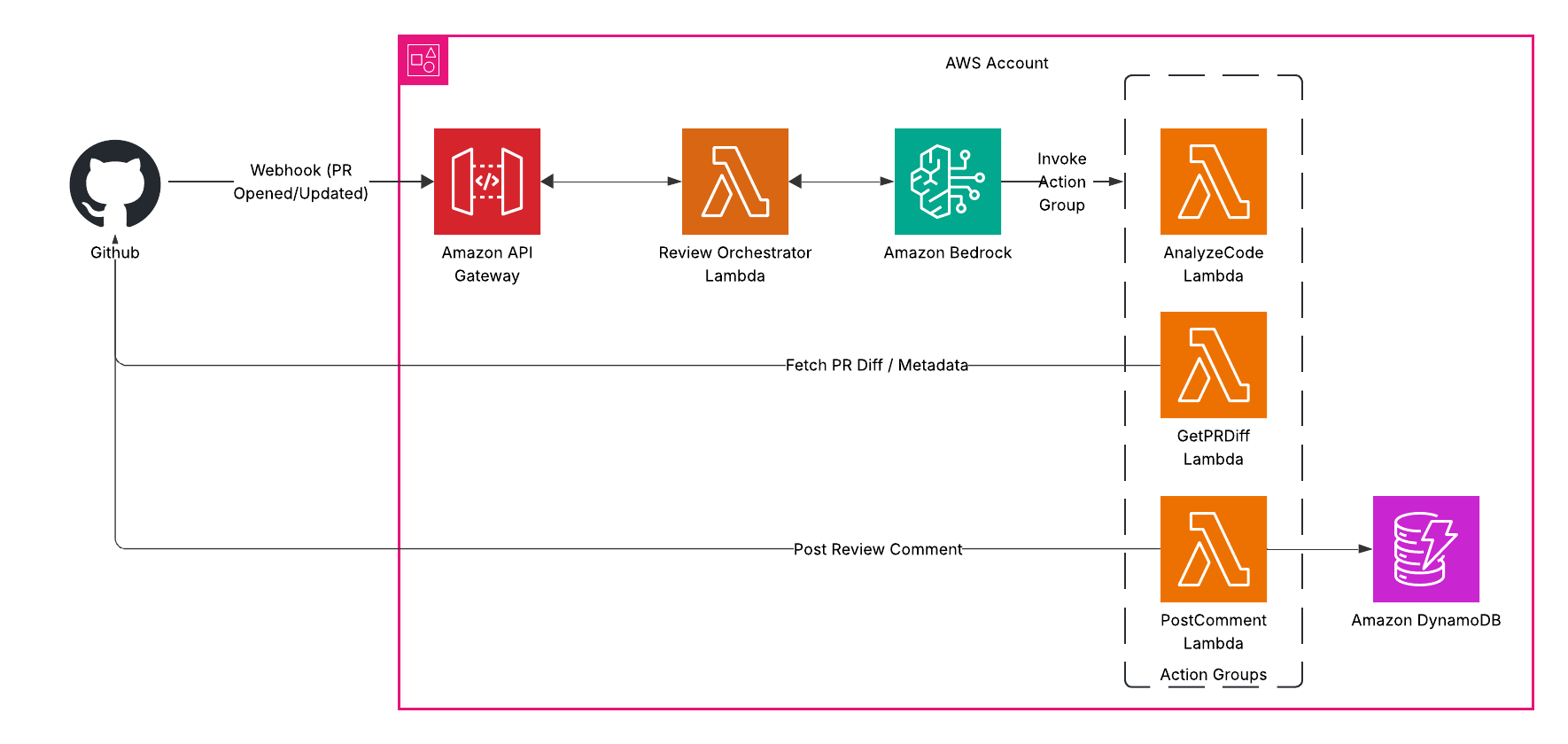
Architecture overview
Here’s how the system works:
GitHub Webhook → EventBridge → Lambda → Bedrock Agent with Action Groups → GitHub API → PR Comments
The key components:
- GitHub Webhook: Triggers on PR events
- EventBridge: Routes events to Lambda
- Lambda: Processes GitHub events and invokes Bedrock Agent
- Bedrock Agent: Coordinates the review process
- Action Groups: Custom Lambda functions that the agent can call
- DynamoDB: Tracks review history and status
This event-driven architecture ensures the review process begins automatically whenever a pull request is opened or updated, without requiring any manual intervention.
What you’ll need
- AWS Account with Bedrock access
- GitHub repository where you want to enable reviews
- GitHub Personal Access Token with repo permissions
- Basic familiarity with AWS and GitHub
Step 1: Create the Action Group Lambda functions
First, let’s create the Lambda functions our Bedrock Agent will use as action groups. We need three functions:
1. Get PR Diff Lambda
This function fetches the pull request details and diff from GitHub:
import json
import os
import boto3
import requests
from github import Github

def lambda_handler(event, context):
    try:
        # Extract parameters from the event
        payload = json.loads(event['body'])
        repo_name = payload['repo_name']
        pr_number = payload['pr_number']

        # Initialize GitHub
        g = Github(os.environ['GITHUB_TOKEN'])
        repo = g.get_repo(repo_name)
        pr = repo.get_pull(int(pr_number))

        # Get PR details and diff
        pr_title = pr.title
        pr_description = pr.body or ""
        pr_author = pr.user.login
        pr_files = [f.filename for f in pr.get_files()]

        diff_url = f"https://github.com/{repo_name}/pull/{pr_number}.diff"
        headers = {'Authorization': f"token {os.environ['GITHUB_TOKEN']}"}
        diff_response = requests.get(diff_url, headers=headers)
        diff = diff_response.text

        # Return everything the agent needs
        return {
            'statusCode': 200,
            'body': json.dumps({
                'pr_title': pr_title,
                'pr_description': pr_description,
                'pr_author': pr_author,
                'pr_files': pr_files,
                'pr_diff': diff
            })
        }
    except Exception as e:
        return {'statusCode': 500, 'body': json.dumps({'error': str(e)})}
2. Analyze Code Lambda
This function sends the code diff to Bedrock for analysis:
import json
import os
import boto3

def lambda_handler(event, context):
    try:
        # Extract parameters from the event
        payload = json.loads(event['body'])
        diff = payload['diff']
        languages = payload.get('languages', [])

        # Create prompt for the LLM
        prompt = f"""
        Please review the following code diff and provide actionable feedback:

        {diff}

        In your analysis, please look for:
        1. Potential bugs or logic errors
        2. Security vulnerabilities
        3. Performance issues
        4. Code style and best practices
        5. Missing tests or documentation

        Format your response as:

        ## Summary
        (Brief overview of the changes and their purpose)

        ## Critical Issues
        (List any serious problems that must be fixed)

        ## Suggestions
        (List minor issues and improvements)

        ## Positive Notes
        (Highlight good practices in the code)
        """

        # Call Bedrock for analysis
        bedrock = boto3.client('bedrock-runtime')
        response = bedrock.invoke_model(
            modelId='anthropic.claude-3-sonnet-20240229-v1:0',
            contentType='application/json',
            accept='application/json',
            body=json.dumps({
                "anthropic_version": "bedrock-2023-05-31",
                "max_tokens": 2000,
                "messages": [{"role": "user", "content": prompt}]
            })
        )

        # Parse and return response
        response_body = json.loads(response['body'].read())
        analysis = response_body['content'][0]['text']

        return {
            'statusCode': 200,
            'body': json.dumps({'analysis': analysis})
        }
    except Exception as e:
        return {'statusCode': 500, 'body': json.dumps({'error': str(e)})}
3. Post Comment Lambda
This function posts the review feedback to the GitHub PR and records the review in DynamoDB:
import json
import os
import boto3
import time
from github import Github

def lambda_handler(event, context):
    try:
        # Extract parameters from the event
        payload = json.loads(event['body'])
        repo_name = payload['repo_name']
        pr_number = payload['pr_number']
        comment = payload['comment']

        # Record review in DynamoDB
        dynamodb = boto3.resource('dynamodb')
        table = dynamodb.Table(os.environ['REVIEW_TABLE'])

        review_id = f"{repo_name}-{pr_number}-{int(time.time())}"
        table.put_item(
            Item={
                'review_id': review_id,
                'repo_name': repo_name,
                'pr_number': pr_number,
                'timestamp': int(time.time()),
                'comment': comment
            }
        )

        # Post comment to GitHub
        g = Github(os.environ['GITHUB_TOKEN'])
        repo = g.get_repo(repo_name)
        pr = repo.get_pull(int(pr_number))

        # Format the comment for GitHub
        formatted_comment = f"""
## AI Code Review 🤖

{comment}

---
*This review was automatically generated by the PR Review Agent. [Learn more](https://example.com/pr-agent)*
        """

        pr.create_issue_comment(formatted_comment)

        return {
            'statusCode': 200,
            'body': json.dumps({
                'review_id': review_id,
                'status': 'Comment posted successfully'
            })
        }
    except Exception as e:
        return {'statusCode': 500, 'body': json.dumps({'error': str(e)})}
Step 2: Set up DynamoDB for tracking reviews
You’ll need a DynamoDB table to track review history. In production, you’d define this in your infrastructure-as-code using Terraform or CloudFormation. The table needs:
- Partition key:
review_id(String) - PAY_PER_REQUEST billing mode for cost efficiency
This table will store metadata about each review, including repository, PR number, timestamp, and the content of the review comment.
Step 3: Create the Bedrock Agent
Now let’s create the agent that will orchestrate the entire review process:
In the Bedrock console, go to “Agents” → “Create agent”
Name it “PRReviewAgent”
Select Claude Sonnet 3.5 for the foundation model
Create three action groups:
a. GetPRDiff
{
  "actionGroupName": "GetPRDiff",
  "description": "Retrieves the diff for a GitHub pull request",
  "apiSchema": {
    "type": "openapi",
    "payload": "openapi: 3.0.0\ninfo:\n  title: GitHub PR Diff API\n  version: 1.0.0\npaths:\n  /getPRDiff:\n    post:\n      summary: Get the diff for a GitHub pull request\n      requestBody:\n        required: true\n        content:\n          application/json:\n            schema:\n              type: object\n              required:\n                - repo_name\n                - pr_number\n              properties:\n                repo_name:\n                  type: string\n                  description: The repository in format 'owner/repo'\n                pr_number:\n                  type: integer\n                  description: The pull request number\n      responses:\n        200:\n          description: Successful response\n          content:\n            application/json:\n              schema:\n                type: object\n                properties:\n                  pr_title:\n                    type: string\n                  pr_description:\n                    type: string\n                  pr_author:\n                    type: string\n                  pr_files:\n                    type: array\n                    items:\n                      type: string\n                  pr_diff:\n                    type: string"
  },
  "actionGroupExecutor": {
    "type": "lambda",
    "lambdaArn": "[YOUR-GET-PR-DIFF-LAMBDA-ARN]"
  }
}
b. AnalyzeCode
{
  "actionGroupName": "AnalyzeCode",
  "description": "Analyzes code for potential issues and improvements",
  "apiSchema": {
    "type": "openapi",
    "payload": "openapi: 3.0.0\ninfo:\n  title: Code Analysis API\n  version: 1.0.0\npaths:\n  /analyzeCode:\n    post:\n      summary: Analyze code diff for issues and suggestions\n      requestBody:\n        required: true\n        content:\n          application/json:\n            schema:\n              type: object\n              required:\n                - diff\n              properties:\n                diff:\n                  type: string\n                  description: The code diff to analyze\n                languages:\n                  type: array\n                  items:\n                    type: string\n                  description: Programming languages in the diff (optional)\n      responses:\n        200:\n          description: Successful analysis\n          content:\n            application/json:\n              schema:\n                type: object\n                properties:\n                  analysis:\n                    type: string"
  },
  "actionGroupExecutor": {
    "type": "lambda",
    "lambdaArn": "[YOUR-ANALYZE-CODE-LAMBDA-ARN]"
  }
}
c. PostComment
{
  "actionGroupName": "PostComment",
  "description": "Posts a review comment to a GitHub pull request",
  "apiSchema": {
    "type": "openapi",
    "payload": "openapi: 3.0.0\ninfo:\n  title: GitHub Comment API\n  version: 1.0.0\npaths:\n  /postComment:\n    post:\n      summary: Post a comment to a GitHub pull request\n      requestBody:\n        required: true\n        content:\n          application/json:\n            schema:\n              type: object\n              required:\n                - repo_name\n                - pr_number\n                - comment\n              properties:\n                repo_name:\n                  type: string\n                  description: The repository in format 'owner/repo'\n                pr_number:\n                  type: integer\n                  description: The pull request number\n                comment:\n                  type: string\n                  description: The comment text to post\n      responses:\n        200:\n          description: Successful response\n          content:\n            application/json:\n              schema:\n                type: object\n                properties:\n                  review_id:\n                    type: string\n                  status:\n                    type: string"
  },
  "actionGroupExecutor": {
    "type": "lambda",
    "lambdaArn": "[YOUR-POST-COMMENT-LAMBDA-ARN]"
  }
}
Configure the agent’s instructions:
You are a helpful GitHub Pull Request reviewer designed to analyze code changes and provide constructive feedback. Your goal is to help developers improve their code by identifying issues and suggesting improvements.

When a PR is submitted:
1. Get the PR diff using the GetPRDiff action
2. Analyze the code for issues using the AnalyzeCode action
3. Post a helpful review comment using the PostComment action

Your reviews should be constructive and educational. Focus on:
- Potential bugs or logic errors
- Security vulnerabilities
- Performance issues
- Code style and best practices
- Missing tests or documentation

Use a professional tone and be concise but thorough in your feedback.
These instructions are crucial as they define how the agent will behave when reviewing code. The careful wording encourages constructive feedback while maintaining a professional tone.
Step 4: Create the main Lambda function
Now create the main Lambda function that will be triggered by GitHub events and coordinate the review process:
import json
import os
import boto3
import logging

# Initialize Bedrock Runtime client
bedrock_agent_runtime = boto3.client('bedrock-agent-runtime')
logger = logging.getLogger()
logger.setLevel(logging.INFO)

def lambda_handler(event, context):
    try:
        # Parse the GitHub webhook event
        github_event = json.loads(event['body'])
        headers = event.get('headers', {})

        # Check if it's a pull request event we care about
        if headers.get('X-GitHub-Event') == 'pull_request':
            action = github_event.get('action')

            # Process only opened or synchronized (updated) PRs
            if action in ('opened', 'synchronize'):
                pr = github_event['pull_request']
                repo_name = github_event['repository']['full_name']
                pr_number = pr['number']

                # Invoke the Bedrock agent to perform the review
                response = bedrock_agent_runtime.invoke_agent(
                    agentId=os.environ['BEDROCK_AGENT_ID'],
                    agentAliasId=os.environ['BEDROCK_AGENT_ALIAS_ID'],
                    sessionId=f"{repo_name}-{pr_number}",
                    inputText=f"Review pull request #{pr_number} in repository {repo_name}"
                )

                # Process agent response
                completion = ''
                for event in response.get('completion', []):
                    chunk = json.loads(event['chunk']['bytes'].decode())
                    if chunk['type'] == 'message':
                        completion += chunk['message']['content'][0]['text']

                return {
                    'statusCode': 200,
                    'body': json.dumps({'status': 'Agent invoked successfully'})
                }

            return {'statusCode': 200, 'body': json.dumps({'status': 'Ignored PR action'})}

        return {'statusCode': 200, 'body': json.dumps({'status': 'Ignored webhook event'})}

    except Exception as e:
        logger.error(f"Error: {str(e)}")
        return {'statusCode': 500, 'body': json.dumps({'error': str(e)})}
Step 5: Create the API Gateway
- Create a new REST API in API Gateway
- Add a POST method for the root resource
- Set the integration type to Lambda Function and select your main function
- Deploy the API to a stage and note the URL
The API Gateway serves as the entry point for GitHub webhooks, receiving events when pull requests are opened or updated.
Step 6: Set up the GitHub webhook
- Go to your GitHub repository
- Navigate to Settings → Webhooks → Add webhook
- Set the Payload URL to your API Gateway URL
- Set Content type to application/json
- Select “Let me select individual events” and check “Pull requests”
- Click “Add webhook”
With the webhook in place, GitHub will now notify your system whenever pull requests are created or updated, triggering the automated review process.
Testing the system
To test your PR review agent:
- Create a simple PR with some code changes
- Check that the webhook is triggered (visible in GitHub webhook settings)
- Verify your Lambda is invoked (check CloudWatch logs)
- Check that a comment appears on the PR with the review
You should see a comprehensive review comment that identifies potential issues, makes suggestions for improvement, and highlights positive aspects of the code changes.
Enhancing the agent
Here are some ways to improve your PR reviewer:
Language-specific rules: Extend the AnalyzeCode lambda to apply language-specific linters or static analysis tools for more precise feedback based on the programming language.
Contextual awareness: Include repository history, architecture documentation, or team standards in the analysis to provide more relevant and contextual suggestions.
Review customization: Allow teams to set review focus areas through configuration. For example, some teams might prioritize security checks while others emphasize performance.
Learning from feedback: Track which suggestions developers implement versus ignore to improve future recommendations and reduce false positives.
PR metadata analysis: Consider PR size, files changed, and complexity when determining the review strategy. Large PRs might receive different handling than small, focused changes.
Inline comments: Enhance the agent to post specific comments on individual lines in the diff rather than just a summary comment.
Pre-commit integration: Offer developers the ability to run the same analysis locally before submitting their PR, using pre-commit hooks.
Cost considerations
This architecture is cost-efficient for most development teams:
- Lambda costs: Typically covered by the free tier for small to medium teams
- API Gateway: Approximately $1 per million requests
- Bedrock API: Around $0.015 per 1,000 tokens with Claude Sonnet
- DynamoDB: Pay-per-request pricing with minimal storage needs
The total cost will vary based on your team’s PR volume and the size of code changes being reviewed, but for most teams, it remains quite affordable compared to the developer time saved.
Security considerations
When implementing this:
- Store API tokens in AWS Secrets Manager
- Set IAM permissions using least privilege
- Consider the sensitivity of code being reviewed
- Remember that agents aren’t perfect at security analysis
While the PR reviewer can identify many common security issues, it should not be your only security control. Critical security reviews should still be performed by security experts, especially for sensitive components.
Conclusion
By combining AWS Bedrock Agents with Action Groups, this architecture creates an intelligent PR review system that helps maintain code quality while reducing the time developers spend on repetitive aspects of code reviews.
The solution provides several key benefits:
- Consistency: Every PR receives the same baseline level of review
- Early detection: Catches common issues before human reviewers see the code
- Educational feedback: Provides context and explanations for suggested improvements
- Focus: Allows human reviewers to concentrate on architecture and business logic
- Historical tracking: Stores reviews for future reference and improvement
While this implementation uses specific AWS services, the architectural patterns can be adapted to other cloud providers or integrated with different version control systems beyond GitHub.
This approach to automated code review represents a practical application of generative AI that delivers immediate value to development teams: better code quality, faster reviews, and more time for developers to focus on creative and complex challenges rather than routine feedback.