Managing AWS costs becomes increasingly complex as infrastructure grows. Organizations often struggle with cloud cost management, spending valuable engineering time manually analyzing Cost Explorer data, identifying optimization opportunities, and implementing changes. Even with dedicated cost management tools, the analysis and remediation process remains largely manual, requiring specialized expertise to interpret cost data and translate it into actionable steps.
This post demonstrates how to build an automated agent that analyzes AWS costs and generates actionable recommendations to reduce cloud spend. By combining AWS Bedrock’s analytical capabilities with Cost Explorer data, the system identifies cost outliers and provides specific optimization steps that go beyond basic visualizations to deliver meaningful insights.
What we’re building
A cost optimization agent that:
- Runs on a schedule (weekly or monthly)
- Fetches detailed cost data from AWS Cost Explorer
- Analyzes spending patterns and identifies optimization opportunities
- Generates a markdown report with specific recommendations
- Sends a summary to Slack or email
- Tracks recommendations and their potential savings
This solution goes beyond basic cost visualization by providing specific, actionable steps to optimize AWS spending—essentially turning data into decisions.
Real-World Applications
This solution addresses cost management challenges across different contexts:
Enterprise FinOps Teams: In larger organizations, the agent provides consistent, ongoing cost analysis that augments the FinOps team’s capabilities, ensuring no optimization opportunity goes unnoticed even as the infrastructure grows in complexity.
Startups and Small Teams: For organizations without dedicated cloud financial analysts, the agent provides expert-level cost optimization recommendations that would otherwise require specialized knowledge or expensive consultants.
Managed Service Providers: MSPs can deploy the agent across client environments, standardizing cost optimization practices while customizing thresholds and priorities for each client’s specific needs.
Development Environments: The agent can enforce stricter cost controls in non-production environments, identifying development and testing resources that can be safely downsized, scheduled, or terminated to reduce costs without affecting production workloads.
Multi-Cloud Strategies: While this implementation focuses on AWS, the architecture pattern can be extended to analyze costs across multiple cloud providers, giving organizations a unified view of optimization opportunities.
Architecture overview
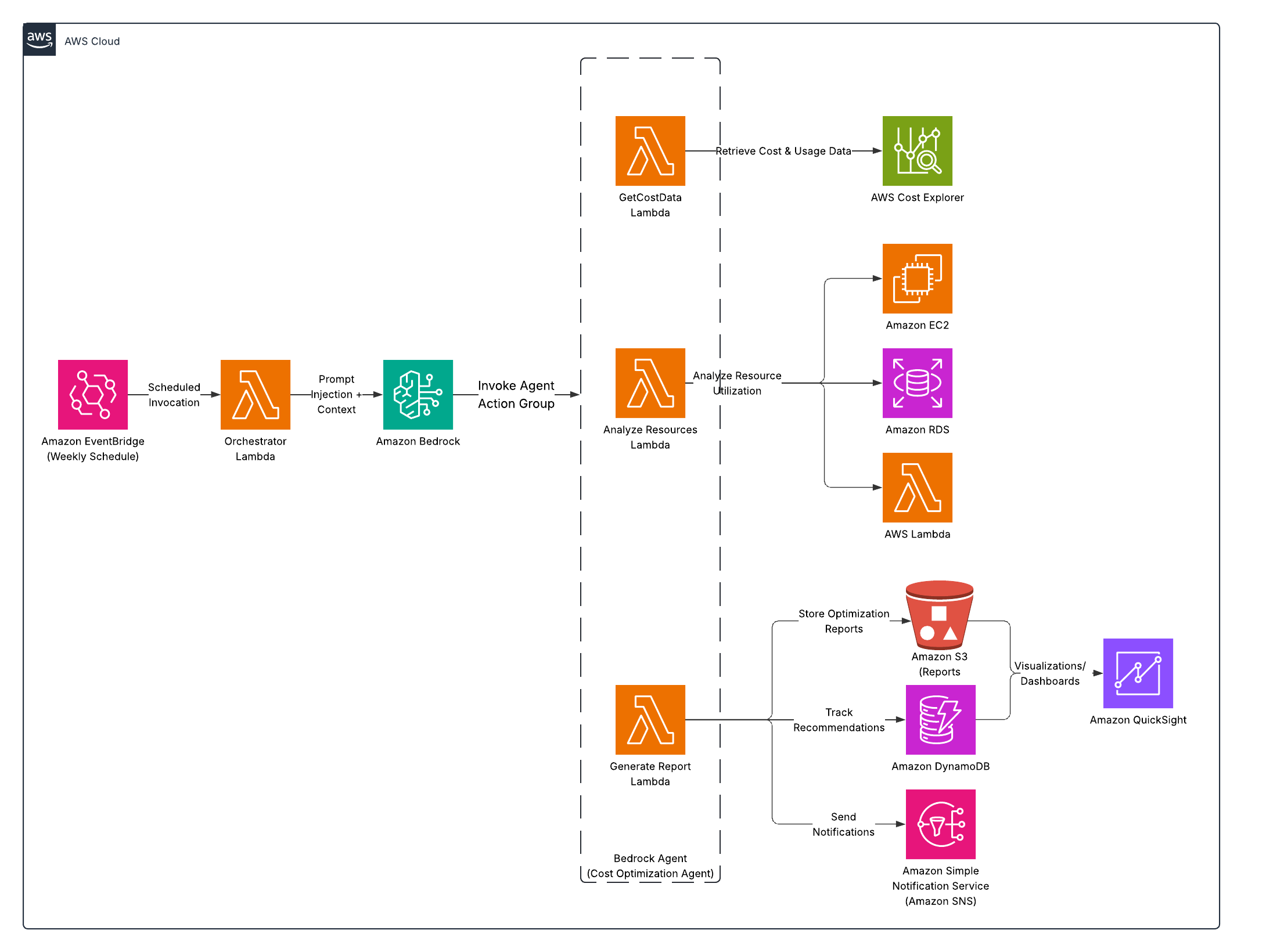
Here’s the high-level architecture:
EventBridge (scheduled) → Lambda → Bedrock Agent with Action Groups → S3 (report) → SNS (notifications)
The key components:
- EventBridge: Triggers the agent on a schedule
- Lambda: Initializes and coordinates the analysis process
- Bedrock Agent: Orchestrates the data gathering and analysis
- Action Groups: Custom Lambda functions for specific tasks
- S3: Stores the generated reports
- SNS: Sends notifications with the summary
- DynamoDB: Tracks recommendations and their implementation status
This event-driven architecture ensures the cost optimization process runs automatically on schedule, eliminating the need for manual intervention and ensuring consistent analysis.
What you’ll need
- AWS Account with Bedrock and Cost Explorer access
- IAM role with appropriate permissions
- S3 bucket for storing reports
- SNS topic or email for notifications
- Basic understanding of AWS services
Step 1: Create the Action Group Lambda functions
First, let’s create the Lambda functions our Bedrock Agent will use as action groups:
1. Cost Data Retrieval Lambda
This function fetches comprehensive cost data from AWS Cost Explorer:
import json
import os
import boto3
import datetime
from dateutil.relativedelta import relativedelta

def lambda_handler(event, context):
    try:
        # Extract parameters from the event
        payload = json.loads(event['body'])
        time_period = payload.get('time_period', 'MONTH')
        services = payload.get('services', [])

        # Configure time period based on request
        end_date = datetime.datetime.now()

        if time_period == 'MONTH':
            start_date = end_date - relativedelta(months=1)
            granularity = 'DAILY'
        elif time_period == 'QUARTER':
            start_date = end_date - relativedelta(months=3)
            granularity = 'MONTHLY'
        elif time_period == 'WEEK':
            start_date = end_date - relativedelta(weeks=1)
            granularity = 'DAILY'
        else:
            # Default to monthly
            start_date = end_date - relativedelta(months=1)
            granularity = 'DAILY'

        # Format dates for Cost Explorer
        start_str = start_date.strftime('%Y-%m-%d')
        end_str = end_date.strftime('%Y-%m-%d')

        # Initialize Cost Explorer client
        ce_client = boto3.client('ce')

        # Get cost data, anomalies, and recommendations
        response = get_cost_data(ce_client, start_str, end_str, granularity)
        anomalies = get_anomalies(ce_client, start_str, end_str)
        reservation_recs = get_reservation_recommendations(ce_client)
        savings_plans_recs = get_savings_plans_recommendations(ce_client)

        # Return the compiled data
        return {
            'statusCode': 200,
            'body': json.dumps({
                'cost_data': response,
                'anomalies': anomalies,
                'reservation_recommendations': reservation_recs,
                'savings_plans_recommendations': savings_plans_recs
            })
        }

    except Exception as e:
        return {'statusCode': 500, 'body': json.dumps({'error': str(e)})}

# Helper functions (implementation details omitted for brevity)
def get_cost_data(ce_client, start_str, end_str, granularity):
    # Implementation details omitted
    return {}

def get_anomalies(ce_client, start_str, end_str):
    # Implementation details omitted
    return []

def get_reservation_recommendations(ce_client):
    # Implementation details omitted
    return []

def get_savings_plans_recommendations(ce_client):
    # Implementation details omitted
    return []
2. Resource Analysis Lambda
This function analyzes AWS resources for optimization opportunities:
import json
import boto3
import datetime

def lambda_handler(event, context):
    try:
        # Extract parameters from the event
        payload = json.loads(event['body'])
        resource_types = payload.get('resource_types', ['ec2', 'rds', 'ebs', 'lambda'])

        results = {}

        # Analyze each resource type
        if 'ec2' in resource_types:
            results['ec2'] = analyze_ec2_instances()

        if 'rds' in resource_types:
            results['rds'] = analyze_rds_instances()

        if 'ebs' in resource_types:
            results['ebs'] = analyze_ebs_volumes()

        if 'lambda' in resource_types:
            results['lambda'] = analyze_lambda_functions()

        return {
            'statusCode': 200,
            'body': json.dumps(results)
        }

    except Exception as e:
        return {'statusCode': 500, 'body': json.dumps({'error': str(e)})}

def analyze_ec2_instances():
    ec2_client = boto3.client('ec2')
    cloudwatch = boto3.client('cloudwatch')

    # Get instances and identify optimization opportunities
    instances = get_all_instances(ec2_client)
    low_utilization = find_low_utilization_instances(instances, cloudwatch)
    potential_downsizing = find_downsizing_opportunities(instances, cloudwatch)

    return {
        'total_instances': len(instances),
        'running_instances': count_running_instances(instances),
        'stopped_instances': count_stopped_instances(instances),
        'low_utilization_instances': low_utilization,
        'potential_downsizing': potential_downsizing
    }

# Helper functions (implementation details omitted for brevity)
def get_all_instances(ec2_client):
    # Implementation details omitted
    return []

def find_low_utilization_instances(instances, cloudwatch):
    # Implementation details omitted
    return []

def find_downsizing_opportunities(instances, cloudwatch):
    # Implementation details omitted
    return []

def count_running_instances(instances):
    # Implementation details omitted
    return 0

def count_stopped_instances(instances):
    # Implementation details omitted
    return 0

def analyze_rds_instances():
    # Implementation details omitted
    return {}

def analyze_ebs_volumes():
    # Implementation details omitted
    return {}

def analyze_lambda_functions():
    # Implementation details omitted
    return {}
3. Report Generation Lambda
This function generates cost optimization reports and sends notifications:
import json
import boto3
import os
import time
from datetime import datetime

def lambda_handler(event, context):
    try:
        # Extract parameters from the event
        payload = json.loads(event['body'])
        cost_data = payload.get('cost_data', {})
        resource_analysis = payload.get('resource_analysis', {})
        destination = payload.get('destination', 'S3')

        # Generate detailed markdown report
        report_content = generate_markdown_report(cost_data, resource_analysis)

        # Create a unique filename with timestamp
        timestamp = datetime.now().strftime('%Y-%m-%d-%H-%M-%S')
        filename = f"cost-optimization-report-{timestamp}.md"

        results = {}

        # Save to S3 if requested
        if destination in ['S3', 'BOTH']:
            s3_url = save_to_s3(report_content, filename)
            results['s3_url'] = s3_url

        # Send notification if requested
        if destination in ['SNS', 'BOTH']:
            summary = generate_summary(cost_data, resource_analysis)
            if 's3_url' in results:
                summary += f"\n\nDetailed report: {results['s3_url']}"

            send_notification(summary, timestamp)
            results['sns_notification'] = 'Sent'

        # Store recommendations in DynamoDB for tracking
        store_recommendations(cost_data, resource_analysis)

        return {
            'statusCode': 200,
            'body': json.dumps(results)
        }

    except Exception as e:
        return {'statusCode': 500, 'body': json.dumps({'error': str(e)})}

# Helper functions (implementation details omitted for brevity)
def generate_markdown_report(cost_data, resource_analysis):
    # Implementation details omitted
    return ""

def save_to_s3(report_content, filename):
    # Implementation details omitted
    return ""

def generate_summary(cost_data, resource_analysis):
    # Implementation details omitted
    return ""

def send_notification(summary, timestamp):
    # Implementation details omitted
    pass

def store_recommendations(cost_data, resource_analysis):
    # Implementation details omitted
    pass
Step 2: Set up DynamoDB for tracking recommendations
You’ll need DynamoDB tables to track reports and recommendations. In production, you’d define these in your infrastructure-as-code using Terraform or CloudFormation. The tables need:
CostOptimizationRecommendations table:
- Partition key:
recommendation_id(String) - PAY_PER_REQUEST billing mode for cost efficiency
- Partition key:
CostOptimizationReports table:
- Partition key:
report_id(String) - PAY_PER_REQUEST billing mode for cost efficiency
- Partition key:
The first table stores individual recommendations with their implementation status, while the second table tracks metadata about generated reports.
Step 3: Create the Bedrock Agent
Now let’s create the agent that will orchestrate the entire analysis process:
In the Bedrock console, go to “Agents” → “Create agent”
Name it “CostOptimizationAgent”
Select Claude Sonnet 3.5 for the foundation model
Create three action groups:
a. GetCostData
{
  "actionGroupName": "GetCostData",
  "description": "Retrieves cost and usage data from AWS Cost Explorer",
  "apiSchema": {
    "type": "openapi",
    "payload": "openapi: 3.0.0\ninfo:\n  title: Cost Explorer API\n  version: 1.0.0\npaths:\n  /getCostData:\n    post:\n      summary: Get cost and usage data from AWS Cost Explorer\n      requestBody:\n        required: true\n        content:\n          application/json:\n            schema:\n              type: object\n              properties:\n                time_period:\n                  type: string\n                  description: The time period to analyze (WEEK, MONTH, QUARTER)\n                services:\n                  type: array\n                  items:\n                    type: string\n                  description: Optional filter for specific AWS services\n      responses:\n        200:\n          description: Successful response with cost data"
  },
  "actionGroupExecutor": {
    "type": "lambda",
    "lambdaArn": "[YOUR-COST-DATA-LAMBDA-ARN]"
  }
}
b. AnalyzeResources
{
  "actionGroupName": "AnalyzeResources",
  "description": "Analyzes AWS resources for optimization opportunities",
  "apiSchema": {
    "type": "openapi",
    "payload": "openapi: 3.0.0\ninfo:\n  title: Resource Analysis API\n  version: 1.0.0\npaths:\n  /analyzeResources:\n    post:\n      summary: Analyze AWS resources for optimization opportunities\n      requestBody:\n        required: true\n        content:\n          application/json:\n            schema:\n              type: object\n              properties:\n                resource_types:\n                  type: array\n                  items:\n                    type: string\n                  description: Resource types to analyze, e.g., 'ec2', 'rds', 'ebs', 'lambda'\n      responses:\n        200:\n          description: Successful analysis of resources"
  },
  "actionGroupExecutor": {
    "type": "lambda",
    "lambdaArn": "[YOUR-RESOURCE-ANALYSIS-LAMBDA-ARN]"
  }
}
c. GenerateReport
{
  "actionGroupName": "GenerateReport",
  "description": "Generates a cost optimization report and sends notifications",
  "apiSchema": {
    "type": "openapi",
    "payload": "openapi: 3.0.0\ninfo:\n  title: Report Generation API\n  version: 1.0.0\npaths:\n  /generateReport:\n    post:\n      summary: Generate a cost optimization report and send notifications\n      requestBody:\n        required: true\n        content:\n          application/json:\n            schema:\n              type: object\n              required:\n                - cost_data\n                - resource_analysis\n              properties:\n                cost_data:\n                  type: object\n                  description: Cost and usage data from Cost Explorer\n                resource_analysis:\n                  type: object\n                  description: Results of resource analysis\n                destination:\n                  type: string\n                  description: Where to send the report (S3, SNS, or BOTH)\n      responses:\n        200:\n          description: Successful report generation"
  },
  "actionGroupExecutor": {
    "type": "lambda",
    "lambdaArn": "[YOUR-REPORT-GENERATION-LAMBDA-ARN]"
  }
}
Configure the agent’s instructions:
You are a helpful cost optimization agent for AWS. Your purpose is to analyze AWS costs and resource usage to identify potential savings opportunities.

When asked to analyze costs:
1. Get cost and usage data using GetCostData action
2. Analyze resources for optimization opportunities using AnalyzeResources action
3. Generate a report of findings and recommendations using GenerateReport action

Your recommendations should be practical and actionable, focusing on:
- EC2 instance optimization (rightsizing, stopping idle instances)
- Unattached or underutilized EBS volumes
- Rarely used Lambda functions
- Reserved Instance or Savings Plans opportunities
- Multi-AZ configurations that might not be needed for non-production

Present findings clearly in order of potential savings, with the highest-impact opportunities first.
These instructions are crucial as they define how the agent will behave when analyzing costs. The careful wording ensures it focuses on the most impactful optimization opportunities.
Step 4: Create the main Lambda function
Create the main Lambda function that will be triggered by the schedule:
import json
import os
import boto3
import logging
import time

# Initialize Bedrock Runtime client
bedrock_agent_runtime = boto3.client('bedrock-agent-runtime')
logger = logging.getLogger()
logger.setLevel(logging.INFO)

def lambda_handler(event, context):
    try:
        # Get parameters from the event
        time_period = event.get('time_period', 'MONTH')

        # Invoke the Bedrock agent
        response = bedrock_agent_runtime.invoke_agent(
            agentId=os.environ['BEDROCK_AGENT_ID'],
            agentAliasId=os.environ['BEDROCK_AGENT_ALIAS_ID'],
            sessionId=f"cost-analysis-{int(time.time())}",
            inputText=f"Analyze AWS costs for the past {time_period.lower()}, look for optimization opportunities, and generate a comprehensive report with specific actionable recommendations."
        )

        # Process agent response
        completion = ''
        for event in response.get('completion', []):
            chunk = json.loads(event['chunk']['bytes'].decode())
            if chunk['type'] == 'message':
                completion += chunk['message']['content'][0]['text']

        return {
            'statusCode': 200,
            'body': json.dumps({'status': 'Cost analysis completed'})
        }

    except Exception as e:
        logger.error(f"Error: {str(e)}")
        return {
            'statusCode': 500,
            'body': json.dumps({'error': str(e)})
        }
Step 5: Set up the EventBridge rule
Create an EventBridge rule to run the analysis on a schedule. In a production environment, you’d define this in your infrastructure-as-code using Terraform or CloudFormation, setting parameters like:
- Rule name: “WeeklyCostOptimizationAnalysis”
- Schedule expression: “cron(0 8 ? * MON *)” (runs every Monday at 8 AM)
- Target: Your main Lambda function
EventBridge ensures the cost analysis runs automatically at your chosen interval without manual intervention.
Step 6: Set up SNS for notifications
Set up an SNS topic for notifications by creating a topic and adding subscribers. In production, you’d define this in your infrastructure-as-code, configuring:
- Topic name: “CostOptimizationAlerts”
- Protocol: Email, SMS, or webhook (based on your preferred notification channel)
- Subscribers: Finance team, cloud administrators, or a Slack webhook
The notification system ensures key stakeholders are informed of optimization opportunities as they’re identified.
Analysis Capabilities
The agent can identify several types of cost optimization opportunities:
1. EC2 Instance Optimization
- Idle Instances: Identifies running instances with CPU utilization consistently below 5%
- Rightsizing Opportunities: Finds instances that could be downsized based on utilization patterns
- Stopped Instances: Locates instances that have been stopped for extended periods
- Instance Family Upgrades: Suggests moving to newer generation instance families
- Reserved Instance Coverage: Identifies on-demand instances that should be covered by RIs
2. Storage Optimization
- Unattached EBS Volumes: Finds volumes not attached to instances
- Old Snapshots: Identifies EBS snapshots older than 6 months
- Underutilized Volumes: Locates volumes with consistently low I/O patterns
- Storage Class Transitions: Recommends moving infrequently accessed data to lower-cost storage tiers
3. Database Optimization
- Overprovisioned RDS Instances: Identifies oversized database instances
- Multi-AZ in Development: Flags multi-AZ deployments in non-production environments
- Idle Databases: Finds database instances with minimal connection counts
- Reserved Instance Opportunities: Suggests RIs for stable database workloads
4. Serverless Optimization
- Overallocated Memory: Identifies Lambda functions with excessive memory allocation
- Rarely Used Functions: Finds functions that are rarely invoked but consume resources
- Long-Running Functions: Suggests optimizations for functions that consistently run long
Cost considerations
This solution is cost-efficient:
- Lambda costs: Most usage will fall under the free tier
- EventBridge: No additional cost for scheduled rules
- Bedrock API: ~$0.015 per 1,000 tokens with Claude Sonnet
- S3: Minimal storage costs for reports
- DynamoDB: Pay-per-request pricing keeps costs very low
- SNS: Practically free for email notifications
For a weekly execution schedule, the infrastructure costs typically remain under $5 per month for most organizations due to the minimal compute resources required.
Extending the solution
Here are some ways to enhance your cost optimization agent:
Multi-account analysis: Extend to analyze costs across an AWS Organization. This offers a comprehensive view of spending across your entire cloud estate.
Implementation tracking: Track which recommendations were implemented and their actual savings. This helps quantify the ROI of the optimization agent.
Automated remediation: Add capability to automatically implement low-risk optimizations like removing unattached EBS volumes. The agent could implement changes automatically during off-hours.
Slack integration: Send reports directly to Slack channels, enabling team discussions around cost optimization opportunities and tagging responsible teams.
Tagging compliance: Check for resources without proper cost allocation tags, ensuring your organization maintains visibility into spend by department, team, or project.
Budget alerts integration: Combine cost optimization with proactive budget alerts, automatically triggering more aggressive analysis when a budget threshold is approaching.
Custom thresholds: Allow different teams or environments to set custom thresholds for what constitutes underutilization based on their specific workload patterns.
Conclusion
This solution leverages several AWS services to create an intelligent cost optimization system that analyzes cloud spending and provides specific recommendations for reducing costs.
Key advantages of this approach include:
- Automation: Regular, scheduled analysis without manual intervention
- Actionable insights: Specific recommendations rather than just data visualization
- Comprehensive coverage: Analysis across multiple resource types (EC2, RDS, Lambda, etc.)
- Prioritization: Recommendations sorted by potential impact
- Integration: Works with existing AWS services and notification systems
The architecture combines the data collection capabilities of AWS Cost Explorer with the analytical power of Amazon Bedrock to generate insights similar to those from a cloud financial analyst. By implementing this solution, organizations can transform cost management from a periodic, manual exercise into an ongoing, automated process.
The system is particularly effective at identifying unused resources, rightsizing opportunities, and reservation/Savings Plans recommendations - areas that often yield significant savings when properly optimized.