“Where can I find our vacation policy?” “What’s the process for requesting new hardware?” “Can you explain our security guidelines?” These questions echo through company Slack channels daily, interrupting workflows and creating redundant work for team leads and HR staff. The same questions get asked repeatedly, and answers are buried in documentation that’s difficult to navigate.
In this post, I’ll show you how to build a simple yet powerful Q&A bot for Slack that leverages your company’s documentation to provide accurate, contextual answers. The best part? It runs entirely on AWS managed services, minimizing operational overhead while delivering immediate value to your organization.
Real-World Applications
This solution addresses documentation challenges across different departments:
HR and People Teams: Employees constantly ask about benefits, PTO policies, and workplace guidelines. An AI bot can instantly answer “How many vacation days do I have?” or “What’s our parental leave policy?” by citing the exact paragraph from your handbook.
Engineering Teams: Technical documentation grows exponentially with your codebase. When an engineer asks “How do I set up the development environment?” or “What’s our database migration process?”, the bot can provide step-by-step instructions from your wiki.
Product and Sales Teams: Sales representatives need quick access to product specifications, pricing details, and competitive positioning. A knowledge bot can answer “What are the enterprise tier limits?” during a client call without disrupting other team members.
Customer Support: Support teams juggle hundreds of internal processes. When an agent needs to know “What’s our escalation policy?” or “How do I process a refund?”, immediate answers improve customer response times.
New Employee Onboarding: The first weeks at a new job involve absorbing massive amounts of information. A knowledge bot gives new hires an accessible way to ask questions without feeling like they’re bothering colleagues.
What We’re Building
A Slack bot that:
- Receives questions from users in a channel or DM
- Uses AWS Bedrock Knowledge Base to search through your company documentation
- Generates accurate answers with citations to source documents
- Handles follow-up questions with conversation history
The system uses Retrieval-Augmented Generation (RAG), combining the reasoning capabilities of large language models with retrieval from your own data sources—giving you the benefits of generative AI while keeping your data within your AWS account.
Understanding Bedrock Knowledge Bases
AWS Bedrock Knowledge Bases represents a significant advancement in enterprise knowledge management. Let’s explore how it works and why it’s superior to traditional search or direct LLM prompting.
The RAG Architecture
Retrieval-Augmented Generation (RAG) addresses a fundamental limitation of LLMs: they have no knowledge of your internal documents. RAG works by:
- Document Processing: Your documents are divided into chunks of an appropriate size for retrieval
- Vector Embedding: Each chunk is converted into a numerical vector representation using an embedding model
- Vector Storage: These embeddings are stored in a vector database (OpenSearch Serverless in Bedrock’s case)
- Semantic Search: When a question arrives, it’s converted to the same vector space and semantically similar chunks are retrieved
- Context Augmentation: Retrieved chunks are injected as context into the prompt sent to the LLM
- Answer Generation: The LLM generates an answer based on this context, citing the relevant sources
This approach dramatically improves accuracy by giving the model direct access to your internal knowledge, while maintaining the reasoning capabilities of foundation models.
Supported Document Types
Bedrock Knowledge Bases supports a wide range of document formats:
- PDF files (text and scanned documents with OCR)
- Microsoft Office (Word, PowerPoint, Excel)
- Text and Markdown files
- HTML and web pages
- CSV and JSON data
This versatility means you can ingest existing documentation without reformatting.
Synchronization and Updates
A key feature is automatic synchronization. When documents in your S3 bucket are updated, Bedrock Knowledge Bases can automatically detect these changes and update the vector store, ensuring your bot always has the latest information.
Semantic vs. Keyword Search
Traditional search systems match keywords, but Bedrock Knowledge Bases understands concepts. If someone asks about “time off,” it can retrieve documents about “vacation,” “PTO,” and “leave of absence” because it understands these concepts are related—even if they don’t share exact keywords.
Architecture Overview
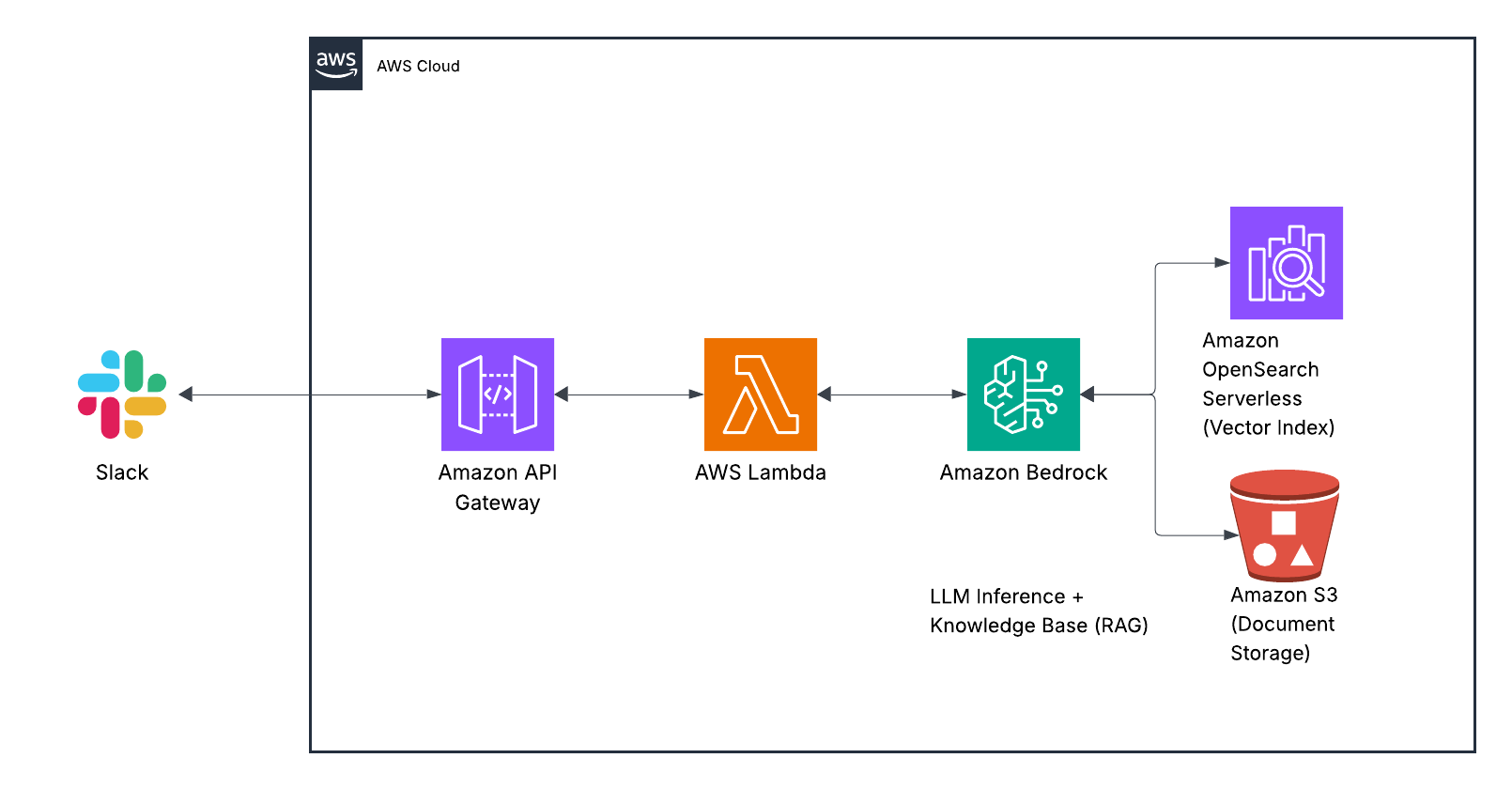
Here’s how the solution components work together:
When a user asks a question in Slack, the message triggers a webhook to API Gateway. This request is processed by a Lambda function that maintains conversation context in DynamoDB and communicates with Bedrock. The Bedrock Agent uses the Knowledge Base to search your documentation, retrieves relevant information, and formulates a response that’s sent back to the user through Slack.
Each component serves a specific purpose in this flow:
- Slack API handles the user interface, making the experience seamless within your existing communication platform.
- API Gateway provides a secure endpoint for Slack to send events to.
- Lambda orchestrates the process, maintaining conversation history and managing the interaction between Slack and Bedrock.
- Bedrock Agent uses Claude to interpret questions, retrieve information, and generate natural-sounding responses.
- Bedrock Knowledge Base indexes and searches your company documentation, finding the most relevant information for each question.
- DynamoDB stores conversation history so the bot can understand follow-up questions in context.
This serverless architecture scales automatically with usage and requires minimal maintenance once deployed.
Prerequisites
Before starting, make sure you have:
- AWS Account with Bedrock access (you’ll need quota for Claude models)
- Slack workspace with permissions to create apps
- Company documentation organized in a folder structure
- Basic familiarity with AWS services and Terraform (or CloudFormation)
Step 1: Create the Knowledge Base
First, we’ll create a Knowledge Base to store and index your company documentation:
Upload documents to an S3 bucket:
aws s3 mb s3://your-company-docs
aws s3 sync ./docs s3://your-company-docs/
Organize your documents logically—folders like HR, Engineering, and Sales help the system understand document context.
Create the Knowledge Base in Bedrock:
Navigate to AWS Bedrock in the console, select “Knowledge bases” → “Create knowledge base,” and follow the wizard:
- Name: “CompanyDocs”
- Data source: Select your S3 bucket
- Vector store: “Create new Amazon OpenSearch Serverless vector store”
- Embedding model: “Titan Embeddings G1” (offers excellent performance for most use cases)
- Enable automatic synchronization to keep your knowledge base updated
The initial data synchronization process will take several minutes depending on the volume of your documents. During this time, Bedrock is analyzing your documents, chunking them appropriately, and converting them into vector embeddings for semantic search.
Step 2: Create the Bedrock Agent
Now let’s create an agent that will use our Knowledge Base:
In the Bedrock console, go to “Agents” → “Create agent”
Name it “CompanyDocsAssistant” and select Claude Sonnet 3.5 for the foundation model
In the “Action groups” section, add a Knowledge Base action group and select the “CompanyDocs” knowledge base we created
Configure the agent’s instructions with detailed guidance:
You are a helpful assistant that answers questions about company documentation, policies, and procedures.

When answering:
1. Be concise but thorough
2. Always cite sources by document name when you provide information
3. If you don't know or can't find relevant information, say so clearly
4. For follow-up questions, maintain context from previous exchanges
5. Format responses with appropriate Slack formatting (bullets, bold, etc.) where helpful
6. Present step-by-step procedures in numbered lists when applicable
For the IAM role, create a new service role with the necessary permissions to access your Knowledge Base
The detailed instructions are crucial—they set the tone and behavior of your assistant, determining how it will respond to various types of questions.
Step 3: Create the Lambda Function
Next, create a Lambda function to handle Slack events and communicate with our Bedrock agent:
import json
import os
import boto3
import logging
import urllib.request
import time
from boto3.dynamodb.conditions import Key

# Initialize clients
bedrock_agent_runtime = boto3.client('bedrock-agent-runtime')
dynamodb = boto3.resource('dynamodb')
conversation_table = dynamodb.Table(os.environ['CONVERSATION_TABLE'])
logger = logging.getLogger()
logger.setLevel(logging.INFO)

def lambda_handler(event, context):
    # Parse the incoming event from Slack
    body = json.loads(event['body'])

    # Handle URL verification challenge
    if body.get('type') == 'url_verification':
        return {'statusCode': 200, 'body': json.dumps({'challenge': body['challenge']})}

    # Process message events (app_mention or direct message)
    if body.get('event', {}).get('type') == 'app_mention' or \
       (body.get('event', {}).get('type') == 'message' and
        body.get('event', {}).get('channel_type') == 'im'):

        event_data = body['event']
        user_id = event_data['user']
        channel_id = event_data['channel']
        text = event_data.get('text', '').replace(f"<@{os.environ['BOT_USER_ID']}>", '').strip()

        # Get conversation history and invoke Bedrock agent
        conversation_id = f"{user_id}:{channel_id}"
        history = get_conversation_history(conversation_id)
        response = invoke_bedrock_agent(text, history, conversation_id)

        # Send response back to Slack
        send_slack_message(channel_id, response)
        return {'statusCode': 200, 'body': json.dumps({'status': 'ok'})}

    return {'statusCode': 200, 'body': json.dumps({'status': 'ignored'})}

def invoke_bedrock_agent(question, history, conversation_id):
    try:
        # Format history for Bedrock and add the current question
        messages = format_conversation_history(history)
        messages.append({
            'role': 'user',
            'content': [{'text': question}]
        })

        # Invoke the Bedrock agent
        response = bedrock_agent_runtime.invoke_agent(
            agentId=os.environ['BEDROCK_AGENT_ID'],
            agentAliasId=os.environ['BEDROCK_AGENT_ALIAS_ID'],
            sessionId=conversation_id,
            inputText=question,
            enableTrace=True
        )

        # Extract and process the response
        completion = process_agent_response(response)

        # Store conversation in DynamoDB for history
        store_conversation_entry(conversation_id, 'user', question)
        store_conversation_entry(conversation_id, 'assistant', completion)

        return completion
    except Exception as e:
        logger.error(f"Error invoking Bedrock agent: {str(e)}")
        return f"I'm having trouble answering that right now. Technical details: {str(e)}"

# Additional helper functions for conversation history, messaging, etc.
# (implementation details omitted for brevity)
This Lambda function handles:
- Receiving events from Slack
- Maintaining conversation context
- Communicating with the Bedrock agent
- Sending responses back to the user
The actual implementation includes additional helpers for conversation history management, message formatting, and error handling that we’ve omitted here for brevity.
Step 4: Set up the DynamoDB Table
You’ll need a DynamoDB table to track conversation history. In production, you’d define this in your infrastructure-as-code using Terraform or CloudFormation. The table needs:
- Partition key:
conversation_id(String) - Sort key:
timestamp(Number) - PAY_PER_REQUEST billing mode for cost efficiency
This table enables the bot to understand follow-up questions by maintaining context from previous exchanges.
Step 5: Create the Slack App
- Go to api.slack.com/apps and create a new app “From scratch”
- Under “OAuth & Permissions,” add these scopes:
app_mentions:readchat:writeim:historyim:read
- Under “Event Subscriptions”:
- Enable Events and set the Request URL to your API Gateway endpoint
- Subscribe to bot events:
app_mentionandmessage.im
- Install the app to your workspace and copy the Bot User OAuth Token
The Slack app configuration establishes the permissions and event subscriptions needed for the bot to receive messages and respond to users.
Step 6: Deploy the API Gateway
Create an API Gateway to receive events from Slack:
- Create a new HTTP API with a POST route that integrates with your Lambda function
- Deploy the API and note the URL
- Update your Slack app’s Event Subscriptions URL with this endpoint
- Add environment variables to your Lambda function:
SLACK_BOT_TOKEN: The OAuth token from your Slack appBOT_USER_ID: The user ID of your Slack botBEDROCK_AGENT_ID: The ID of your Bedrock agentBEDROCK_AGENT_ALIAS_ID: The alias ID of your agentCONVERSATION_TABLE: Your DynamoDB table name
Cost Optimization
This solution is cost-effective, but there are a few considerations:
- Bedrock API calls: ~$0.015 per 1,000 tokens with Claude Sonnet
- Knowledge Base storage: ~$0.023/GB for S3 + OpenSearch Serverless vector storage
- Lambda: Free tier likely covers most usage patterns
- DynamoDB: Pay-per-request pricing keeps costs low
- API Gateway: ~$1 per million requests
For a team of 20 people asking 10 questions per day, expect costs around $30-50 per month. You can implement usage tracking to monitor and control costs as adoption grows.
Extending the Solution
Here are some ways to enhance this basic implementation:
- Multi-channel support: Monitor multiple Slack channels with channel-specific knowledge bases
- Document syncing: Set up automatic synchronization with your documentation systems
- Permissions: Implement access controls based on Slack user groups
- Analytics: Track common questions to identify gaps in your documentation
- Multi-model support: Use a simpler model for basic questions and Claude for complex ones
- Conversation summarization: Periodically summarize long conversations for better context management
Conclusion
With just a few AWS services, you’ve built an intelligent assistant that makes your company’s documentation accessible via Slack. No more hunting through SharePoint or Confluence—just ask the bot and get instant answers with citations to the source material.
The real power here is that your data remains within your AWS account, the system only has access to approved documents, and it continuously improves as you add more documentation. As AWS enhances Bedrock’s capabilities, your bot will automatically benefit from these improvements without any changes to your architecture.
This solution demonstrates how easily companies can now deploy practical AI applications using managed services. What used to require a specialized ML team and months of development can now be built in days using serverless components.
What documentation would you connect to your knowledge bot first? Let me know in the comments or on Twitter!